My ASEAN Free GPS Map Project

Free Galactio, Garmin, iGO Primo, Papago and Polnav map for Malaysia, Singapore, Brunei, Indonesia and Thailand
It is currently Thu Jun 20, 2013 6:45 am

All times are UTC + 8 hours


Forum rules


1. Be nice to each other and respect the moderators. Post in normal font size, color and weight. Follow Nettiquette
2. NO out of topic. Discuss matters pertaining MFM community and forum only.
3. NO abuse, profanity and insults
4. NO spamming, cross posting and opening of duplicate topics
5. NO advertisement post or link
6. NO post/link to warez, cracks, serials or illegally obtained copyrighted content
7. Each message posted is owned by and is the opinion of the original poster. Neither mfm nor its owner or moderators are legally responsible for anything posted on the forum


Post new topic Reply to topic  [ 6 posts ] 
Author Message
 Post subject: How to view, activate and deactivate my maps
PostPosted: Sat Mar 28, 2009 8:48 pm 
Offline
Site Admin (retired)
User avatar

Joined: Sun Sep 14, 2008 11:42 am
Posts: 1518
Location: Acquiring satellites....
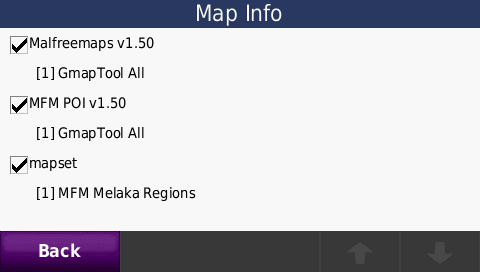
On Garmin Nuvi
Image --> Image
Image --> Image
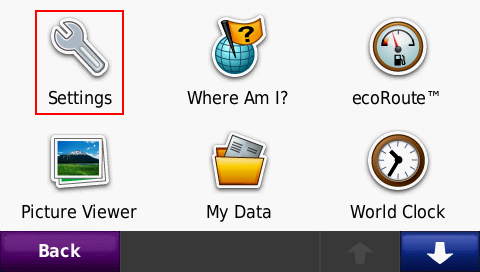
1. At the main menu, press "Tools"
2. Press "Settings"
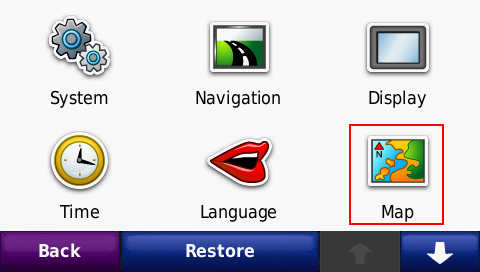
3. Press "Map"
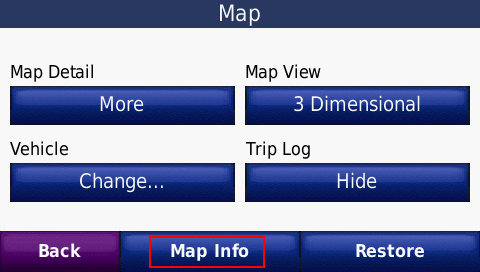
4. Press "Map Info"
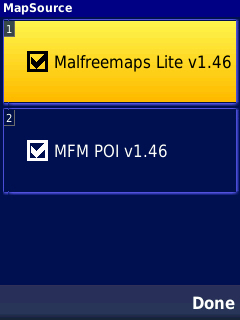
5. At the Map Info page, you can view the list of maps currently loaded into your Nuvi. You can also activate (check) or deactivate (uncheck) them


Top
 Profile  
 

Support Our Sponsor

Support Our Sponsor
 

 Post subject: Re: How to view, activate and deactivate my maps
PostPosted: Sat Mar 28, 2009 9:05 pm 
Offline
Site Admin (retired)
User avatar

Joined: Sun Sep 14, 2008 11:42 am
Posts: 1518
Location: Acquiring satellites....
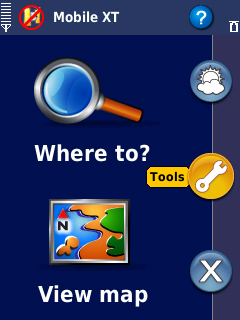
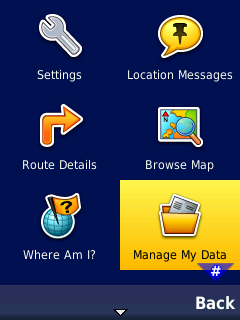
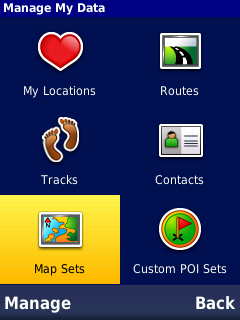
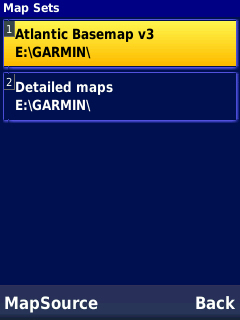
On MobileXT
Image --> Image --> Image
Image --> Image
1. At the main menu, press "Tools"
2. Press "Manage My Data"
3. Press "Map Sets"
4. Select "Mapsource"
5. At the Map Info page, you can view the list of maps currently loaded into your MXT. You can also activate (check) or deactivate (uncheck) them


Top
 Profile  
 
 Post subject: Re: How to view, activate and deactivate my maps
PostPosted: Sun Mar 29, 2009 6:59 am 
Offline
Site Admin (retired)
User avatar

Joined: Sun Sep 14, 2008 11:42 am
Posts: 1518
Location: Acquiring satellites....
On Papago R-series with X5 software

1. Tap Advance Settings
2. Scroll all the way down until the "Software" section. Select "Map Switch"
3. Select the map to activate


Top
 Profile  
 
 Post subject: Re: How to view, activate and deactivate my maps
PostPosted: Sun Mar 29, 2009 12:13 pm 
Offline
Site Admin (retired)
User avatar

Joined: Sun Sep 14, 2008 11:42 am
Posts: 1518
Location: Acquiring satellites....
On Holux or Wayway with X3 software
1. Tap Advance Settings
2. Tap Map Switch
3. Select the map


Top
 Profile  
 
 Post subject: Re: How to view, activate and deactivate my maps
PostPosted: Fri Dec 11, 2009 10:34 pm 
Offline
Site Admin (retired)
User avatar

Joined: Sun Sep 14, 2008 11:42 am
Posts: 1518
Location: Acquiring satellites....
/Deleted older posts and added guides for Papago-based devices


Top
 Profile  
 
 Post subject: Re: How to view, activate and deactivate my maps
PostPosted: Tue Dec 29, 2009 3:47 pm 
Offline

Joined: Tue Dec 29, 2009 3:09 pm
Posts: 1
Hope someone can help me ... I made all the installations already on my nokia 5800. GPS is working ok. Problem is it doesnt have the detail map. I had the detail map copied to \garmin\ folder on my hp. When I check on this thread, I realised that I dont have the option of Tools > Manage My Data > Map Sets > MapSource. Mine is only have "Back" Option when click Tools > Manage My Data > Map Sets >. Hope someone is kind enough to offer solution. Thanks, :).


Top
 Profile  
 
Display posts from previous:  Sort by  
Post new topic Reply to topic  [ 6 posts ] 

All times are UTC + 8 hours


Who is online

Users browsing this forum: No registered users and 1 guest


You cannot post new topics in this forum
You cannot reply to topics in this forum
You cannot edit your posts in this forum
You cannot delete your posts in this forum
You cannot post attachments in this forum

Search for:
Jump to:  


Powered by phpBB © 2000, 2002, 2005, 2007 phpBB Group